The 100-millisecond rule: Why Core Web Vitals are still the biggest conversion lever in eCommerce

There's a stat making the rounds in 2026 that deserves more attention than it's getting: every 100-millisecond improvement in page load time can increase eCommerce conversion rates by up to 7%. For a store generating $10 million annually, a 500ms improvement translates to roughly $500,000 in recovered revenue.
These aren't theoretical numbers. They come from aggregated real-user data across thousands of eCommerce sites, and they've been corroborated by Google's own research as well as studies from Deloitte and multiple independent performance consultancies. Yet despite the data being clear, the majority of eCommerce sites still fail to meet Core Web Vitals thresholds, and the gap between those that do and those that don't is widening.
3 metrics that control your revenue
Core Web Vitals in 2026 comprise three metrics that together describe the user experience of loading a page:
- Largest Contentful Paint (LCP): Measures how quickly the largest visible content element renders. Target: under 2.5 seconds.
- Interaction to Next Paint (INP): Replaced First Input Delay in 2024, measuring responsiveness across all user interactions. Target: under 200 milliseconds.
- Cumulative Layout Shift (CLS): Measures visual stability, whether elements jump around as the page loads. Target: under 0.1.
For eCommerce sites, each of these metrics maps directly to a revenue-critical moment. LCP determines whether your product images and prices appear before the customer's patience runs out. INP determines whether "Add to Cart" actually feels instant. CLS determines whether your checkout button moves just as the customer tries to tap it, sending them to the wrong page or causing hesitation that ends the session.
Why your performance scores are lying to you: the lab vs. field data gap
Understanding which metrics matter is only half the battle. The other half is measuring them correctly, and most teams aren't.
Matt Zeunert's guide on effectively monitoring web performance, published in Smashing Magazine, draws a critical distinction between lab data and field data. Lab data, from tools like Lighthouse, PageSpeed Insights, and WebPageTest, tells you about performance under controlled conditions. It's essential for debugging and optimisation.
But field data, collected from real users in real sessions, tells you what's actually happening. And the two can diverge dramatically.
A product page that scores 95 on Lighthouse might still deliver poor LCP to 15% of your users, the ones on older Android devices, on congested mobile networks, in regions far from your CDN edge. A checkout flow that works perfectly in synthetic tests might exhibit terrible INP when real users interact with coupon code fields, address autocomplete, and payment method selectors in unpredictable sequences.
The stores winning the performance game in 2026 aren't just running Lighthouse audits. They're collecting real-user metrics continuously, segmenting by device, geography, and user journey, and correlating performance data with business outcomes.
The silent conversion killer your monitoring tools miss: site search
The lab vs. field data gap is not just an abstract measurement problem; it has a direct, costly real-world consequence. The most common example? Site search.
Smashing Magazine's recent deep-dive into the eCommerce site search paradox highlighted another dimension of the performance-revenue connection that's often overlooked. According to Forrester research cited in the article, users who use site search are 2-3 times more likely to convert, but only if the search actually works. And 80% of users will leave a site if the search experience is poor.
Here's where performance monitoring intersects with functionality monitoring. A site search feature that's technically functional but responds in 3 seconds instead of 300 milliseconds isn't "broken" in the traditional sense. No error is thrown. No test fails. But it's destroying conversion rates as surely as a 500 error would.
This is the category of issue that falls through the cracks of traditional monitoring approaches. APM tools track server response times. Synthetic tests check that search returns results. But neither captures the real-user experience: the hesitation, the repeated queries, the eventual abandonment by a customer who was actively trying to buy.
The Interop 2026 tailwind: a structural fix for CLS and INP
While much of performance optimisation involves trade-offs and ongoing vigilance, 2026 brings a meaningful structural opportunity: Interop 2026, the collaborative initiative between Chrome, Safari, and Firefox to bring consistent support to new web platform features. As covered by CSS-Tricks, this year's focus areas include anchor positioning, advanced attr(), container style queries, scroll-driven animations, and the contrast-color() function.
Why does this matter for eCommerce performance? Because many of the performance workarounds that developers have relied on for years, JavaScript-based positioning, layout hacks for dynamic content, polyfills for missing CSS features, can now be replaced with native CSS that's consistent across browsers.
Native CSS features are faster. They don't block the main thread. They don't add to your JavaScript bundle. And critically for Core Web Vitals, they don't cause the layout recalculations that drive CLS scores up. When anchor positioning is natively supported, you don't need a JavaScript tooltip library. When container style queries work everywhere, you don't need resize observers to adapt component layouts.
The stores that adopt these native capabilities first will see measurable improvements in INP and CLS scores, and the conversion gains that follow.
What this means for your team
If you're managing an eCommerce site in 2026, here's the practical framework:
- Baseline your Core Web Vitals from field data, not lab data. Your CrUX scores are a start, but you need session-level granularity to act on problems.
- Audit your JavaScript bundle for CSS-replaceable functionality. With Interop 2026 bringing cross-browser consistency to features like anchor positioning and container queries, every tooltip library and resize observer is a candidate for removal.
- Monitor site search performance as a conversion metric, not just a functionality check. Response time, result relevance, and click-through from search results are leading indicators of revenue.
- Connect performance data to revenue data. Knowing your LCP is 2.8 seconds isn't actionable. Knowing that sessions with LCP over 2.5 seconds convert at 40% lower rates is.
How AuditIQ helps you stay ahead
AuditIQ bridges the gap between performance metrics and revenue outcomes for eCommerce teams. By monitoring real user sessions across your entire site, product pages, search, checkout, and post-purchase, AuditIQ surfaces the performance regressions and functional errors that directly impact your bottom line.
Rather than waiting for your Core Web Vitals to decline in monthly CrUX reports, AuditIQ provides continuous visibility into how your site performs for actual customers. When a new deployment degrades INP on your checkout page, or a third-party script pushes your LCP past threshold, you'll know within minutes, not weeks.
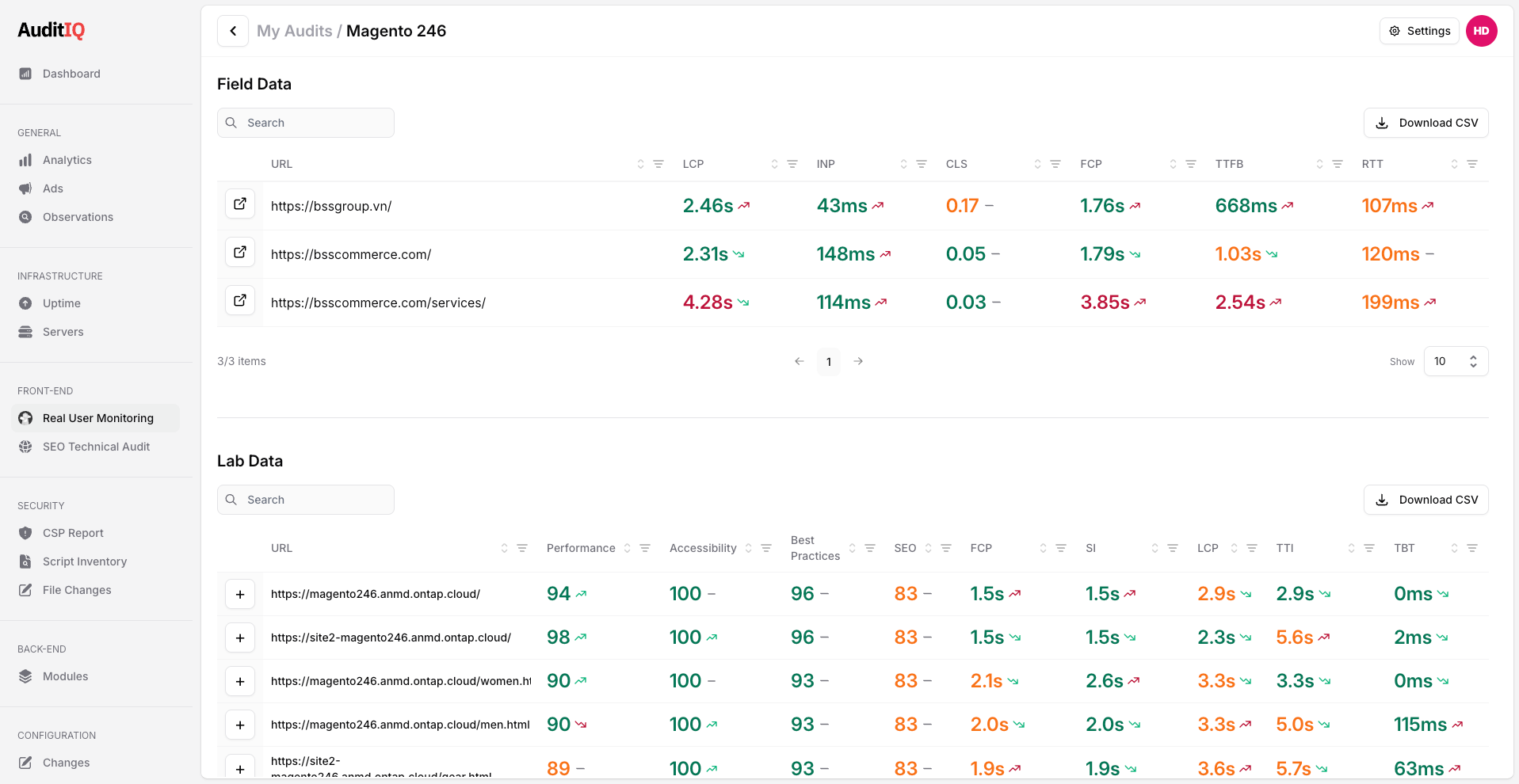 AuditIQ Core Web Vitals Monitoring
The 100-millisecond rule isn't going away. Neither is the opportunity to capture the revenue that your competitors are leaving on the table. Start monitoring what matters with AuditIQ.
About the author
Dan Garner writes from AuditIQ's experience monitoring eCommerce performance, SEO, security, and reliability issues across Magento, Shopify, WooCommerce, and Adobe Commerce stores.